August 30, 2026 · devlog
How apps work in Rasputin — names, storage, and the catalog
Changing up the posts going forward. The first twelve were bench incidents — a thing broke, here’s why. From here they explain how a piece of Rasputin works, one that is either in active development or just released, so that folks can chime in on any particular area they might feel opinionated about. Starting with apps.
An app in Rasputin is a Docker Compose stack with a name, a target node, and a
row in the control plane’s database. The control plane never runs your
containers itself — it hands the compose YAML to the agent on the node you
picked, and that agent shells out to docker compose.
The basics
- Install, stop and delete are jobs on the same bus as everything else —
app.deploy,app.stop,app.delete. They land in the Tasks feed next to OS updates and firewall pushes, with the same failure detail. - Each stack deploys as a compose project named
rasp_<appId>, so nothing Rasputin runs collides with anything you already run by hand on that box. - Target nodes must hold the
computerole. The Control Plane, Firewall, and storage nodes are not selectable as targets. Disallowing the Control Plane for hosting apps is intentional even though it forces a minimum cluster size of 2. We ran into too many complications when testing a few dozen different apps to allow it. - Delete actually tears down. The saga runs
docker compose downfirst; if the node is reachable and the stop fails, the record stays rather than leaving you an invisible container thatrestart: unless-stoppedbrings back forever. - Compose, not Kubernetes. The self-hosting/homelab community is really familiar with compose already. And they have “strong” opinions on the complexity of k8s in a home environment.
Names and networks
Every deployed app gets a real hostname and a real certificate (assuming TLS, of course) with no configuration from you. There are two names, one per network:
| Where you are | Name | Answered by |
|---|---|---|
| Tailnet | <app>.<cluster-id>.internal | MagicDNS |
| LAN | <app>.lan.<cluster-id>.internal | the control plane’s own nameserver |
So jellyfin.home1.internal over the mesh, jellyfin.lan.home1.internal at
home. One name, one answer, everywhere — I picked distinct names per network
rather than split-horizon so that a name never resolves to an address that’s
wrong for where you’re standing.
The LAN side is an authoritative nameserver embedded in the control plane
(miekg/dns, in-process), serving node and app records projected live from the
inventory and apps tables. Nothing is hand-edited, and because node IPs come
from DHCP and often move on reboots, the records follow the lease without a
reconcile job. It binds the LAN interface by name and leaves systemd-resolved’s
stub on 127.0.0.53 alone, which matters because that stub is what publishes
the cluster’s .local discovery name.
Getting the LAN to ask it is one line. With a Rasputin firewall in the path
the conditional forward is pushed automatically as a firewall intent; without
one, you add a single forward rule on whatever already serves your LAN DNS. If
you’d rather not, direct nodeIP:port links never stop working.
TLS is a per-app leaf minted from the installation’s own CA on the control
plane, shipped to the target node over the bus, and terminated by a node-local
Caddy running auto_https off. Reminder, you trust this CA on first boot. The
CA key never leaves the control plane; nodes hold leaves only. Leaves re-mint
on a timer and only advance on disk once the node has accepted the new one, so
a node that was offline during its renewal window retries instead of being
left behind. Any device that trusted the cluster during first-run gets a green
padlock on both networks.
Two consequences worth stating plainly:
- Apps are tailnet-only by default. LAN access is a per-app toggle on the install form, and it is enforced by the proxy’s bind, not by DNS. A tailnet-only app is not listening on the LAN interface at all, so steering the name away isn’t the only thing standing between it and a LAN client who knows the port. This adds a measure of control when Rasputin might be sitting on a network shared by a bunch of college roommates who like to play pranks.
- App names are RFC 1123 labels — lowercase, no underscores, no leading or trailing hyphen, unique case-insensitively. The name you type becomes a DNS label and a certificate SAN, so it has to be one.
Storage
Storage is node-local, during this alpha stage, and lives on the node’s boot medium. The contracts are deliberately blunt:
- Docker named volumes survive an OS update untouched. The image roots
Docker’s state on the writable
persistentpartition, so an A/B update never goes near your data. Copy-pasted compose recipes are safe by default, which is the whole point. - Bind mounts belong under
/var/lib/rasputin/apps/<appId>/data/. The rootfs is read-only squashfs; a bind mount anywhere else either fails to mount or quietly lands on tmpfs and vanishes at reboot. target_nodeis a home, not a scheduling hint. There is no failover and no move-with-data flow. Re-targeting an app starts it elsewhere without its data, and a re-flash wipes the partition — that is the deliberate factory-reset behaviour.
There’s no shared or replicated storage layer yet, so “my data is safe if a node dies” is only true with a backup. More on that below.
To restate, storage is coming, and is the general gate when we move out of alpha and into a dedicated beta.
Two ways to deploy
Install a catalog tile, which seeds the compose YAML, the published port, the arch gate and a first-run note for you. Or paste your own compose YAML, pick a node, and go. Same table, same jobs, same hostname and certificate treatment either way — a hand-written stack is not a second-class citizen.
The catalog
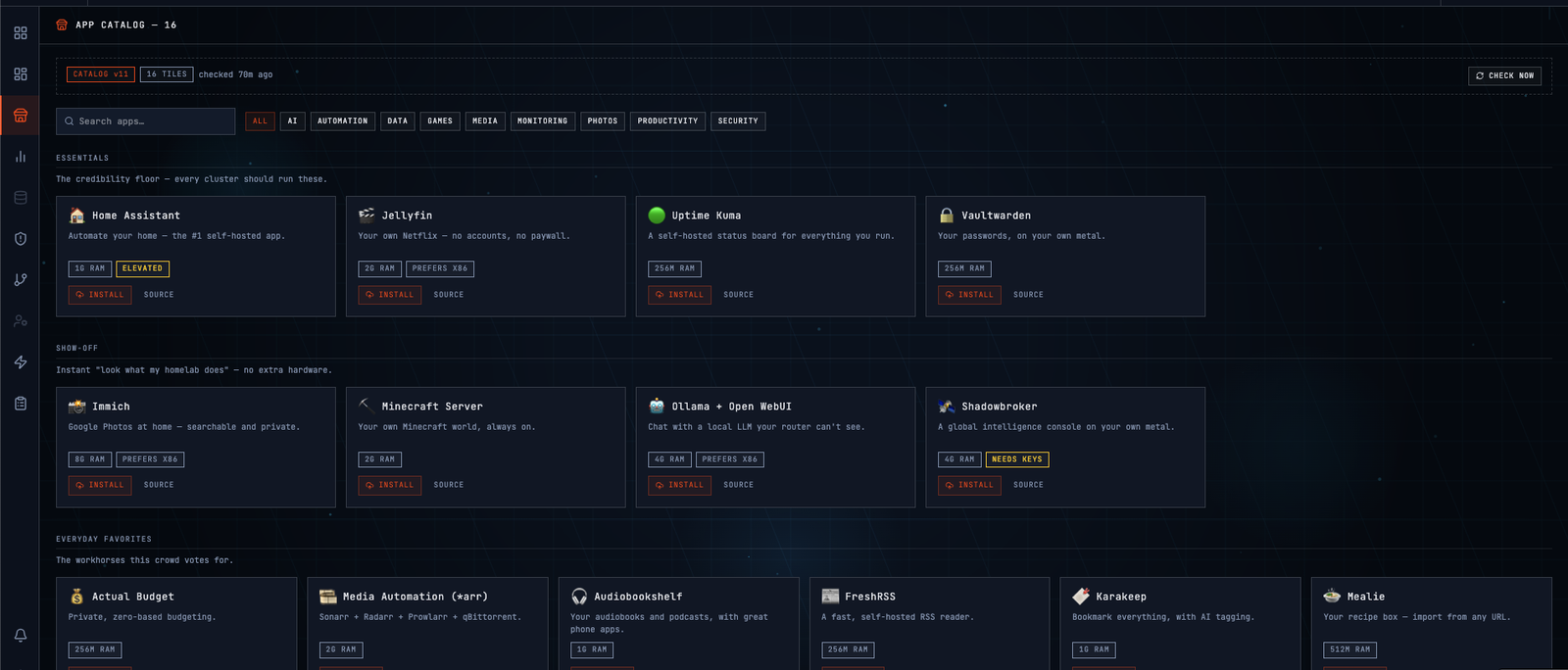
A tile is a template — a tile.json and a docker-compose.yml per app, every
image pinned by digest. Until this week the catalog was compiled into the
control-plane binary, so adding an app meant a version cut across three repos.
It now lives in its own public repo: one signed bundle per release, fetched
daily (by the control plane), verified against the root CA in your image, swapped in atomically.
Versions only go up. A cluster that has never reached the internet runs the copy
in its own binary (created at build time), and says so instead of looking current.
Privilege is the part I’d like opinions on. The validator used to refuse
privileged, host networking, host PID/IPC and any cap_add, which blocked
Home Assistant while permitting security_opt: seccomp=unconfined. The rule now is no undeclared privilege: a tile names its
tier — routine, elevated, host-trusting — with its grants and a reason;
your cluster re-derives that from the compose and refuses the tile if the stack
takes more than it declared; you consent at install in proportion to the tier,
and can withdraw it afterwards. One path stays refused at every tier: anything
reaching Rasputin’s own trust chain, since an app that can rewrite the trust
store authorises every update after it.
Sixteen tiles today, each installed and opened on real Pi 5 and N100 hardware. Two more failed that bench and were pulled rather than shipped broken. We’ll continue to work on those and to add more apps.
Submit issues at the Rasputin App Catalog to request additional apps.
Where this puts the project
Rasputin moves out of pre-alpha today. The first-party app catalog is the line I’m calling alpha — it’s the point where the thing stops being a control plane I demo and starts being a box you can install software onto.
Backups are the piece that isn’t built, and I’m not going to dress that up.
Today a re-flashed node takes its app data with it and the only safety net is
whatever you copy off yourself. The design is settled — every volume a tile
declares carries a backup class, so a password vault is always captured and an
Ollama model cache never is; critical volumes can’t be switched off by the
user; the job stops the container for a clean copy instead of teaching the agent
about a dozen database engines, with dumps reserved for the apps where a brief
outage genuinely hurts, like Pi-hole and Home Assistant. No tile ships as
critical until I’ve demonstrated a restore round-trip on the bench, because a
backup nobody has restored is not a backup. I’m holding all of it until after
alpha so the catalog goes first, and when the backup job lands with that restore
proven, that’s the line I’ll call beta.
Rasputin is an open-source (AGPL) homelab cluster system — a control plane, node OS, and firewall image that make a few Raspberry Pis or amd64 boxes behave like one appliance. It’s alpha, on GitHub, and I’m looking for a handful of design partners to run it and tell me what’s broken.
Want the next one in your inbox? Subscribe, or grab the RSS feed. Found something broken? We're recruiting design partners.